 This is my result of the christmas tree, I did try to remake the needle pine again and again but it all came out the same so when I did the tree and tried to make the the brush again and still nothing change so I left it how it was.
Tuesday, 15 December 2015
Christmas tree
Well for a start this even thought it had instructions I found difficult getting the pine needle exactly like the one from the web.
 This is my result of the christmas tree, I did try to remake the needle pine again and again but it all came out the same so when I did the tree and tried to make the the brush again and still nothing change so I left it how it was.
Thursday, 10 December 2015
My christmas card design result

This is the my final design of my christmas card and from what i think i think i did a good job for it being my first time but I would say i've not done a bad job at it. My one downer was the snow on the sea, wasn't how I imaged it to look like but it was the nears thing so if could have been done again, I would try and figure a way to get the snow looking more like snow.
Inside the message is Have a magically Christmas and an amazing new year'.
This card i would say would soemthing that females between 30-55 and men aged between 50-65. I think people who like the sea and maybe more of a nighttime person would like this more.
I would probley market my card from a tourist shop, because i think it would make a good card for someone who here on holiday and something they would pick up to keep maybe or you know to give to someone.
Candy
In this lesson we learn how to create this.

We started by getting a new page up using 100 pixels for both width and hight, Once that was up we dragged the ruler into the middle of the page. With that we used shapes to get a rectangle and drew it in the middle. Then instead of making two more we pressed alt button and moved them to each side; Once that was done I moved the side rectangle more at the side to give the gaps more space.

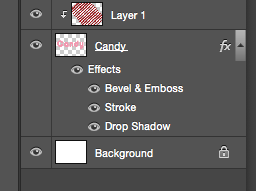
The next bit was we made a new page where we used the Text tool and wrote Candy in a white, pink, red colour. Next we used the paint bucket and changed it to pattern so when we pressed it onto the page all the stripes were on top of Candy; Next was the Create Clipper Mask which made the stripes disappear into the background and leaves the stripes on the candy along with the pink, white, red colour
Once that was done we went and used fx Tool on the right bottom bit where we used stroke which gave the outer word a bright colour line, Next was the Drop Shadow with gave us the green glow.
Lastly we used Bevel & Emboss which made the word bolder and comes out at you which makes it look better.

We started by getting a new page up using 100 pixels for both width and hight, Once that was up we dragged the ruler into the middle of the page. With that we used shapes to get a rectangle and drew it in the middle. Then instead of making two more we pressed alt button and moved them to each side; Once that was done I moved the side rectangle more at the side to give the gaps more space.

The next bit was we made a new page where we used the Text tool and wrote Candy in a white, pink, red colour. Next we used the paint bucket and changed it to pattern so when we pressed it onto the page all the stripes were on top of Candy; Next was the Create Clipper Mask which made the stripes disappear into the background and leaves the stripes on the candy along with the pink, white, red colour
Once that was done we went and used fx Tool on the right bottom bit where we used stroke which gave the outer word a bright colour line, Next was the Drop Shadow with gave us the green glow.
Lastly we used Bevel & Emboss which made the word bolder and comes out at you which makes it look better.
Thursday, 3 December 2015
Christmas card plan
This is a small christmas design I made. These are the layers of each bit I did to get to the last one.It just a little play around which I made into a moon which I'll be using in my actual card.


 This is the start of my design for my cards, still got a bit more to go.


 This is the start of my design for my cards, still got a bit more to go.
Tuesday, 1 December 2015
Moving animation

Guitarist interview
Interviewing Guitarist
Todays lesson we edited a interview video recorded from 5 shots. (Close up, Over shoulder, Wide shot, unusual shot and a interview shot). Now when that was happening I was ill so I wasn't really sure what we were doing but Tobie explained it to me and gave me a sheet with what each shot was. At the end I got my video edited and finish. I've now exported and is now download onto Youtube plus theres a link on Facebook. It was a bit tricky getting the sound the same as the video but I think I did good.
I enjoyed also watching the others video, some were quite funny and loud, some were very good.
I think for mine if I were to do it again I would have done it differently by having the interview sound playing whilst different shots of Tobie playing the guitar.
Heres a link to my video:
https://www.youtube.com/watch?v=TO08OROAxmA&feature=youtu.be
Monday, 30 November 2015
Employability
Todays lesson we started with a warm up on industrial media jobs and name the skill need for that job.
then watched a youtube clip from the apprentice when the female side are pitching a shampoo product and answer the question on the board
'Was it a success and why?
What was good and what was bad?
What you would have done differently?
What you would have done differently?
Kind of similar to the question we had to answer.
Next we talked in pairs about what pitching is; I use video pitching like when someone create a tv show the person needs a producer and a tv company ever broadcast or cable to air the show and its them who decides to keep the show or not bother.
We then went back to our presentation we started a while back about media jobs we would like, mine is writer and director (but mostly the writer job) Then on photoshop he needed to make an message map and used what you've written and put in on the bored (Just one of the jobs)
Heres the message map


Subscribe to:
Posts (Atom)